
Download BSR Screen Recorder – screen recorder, video capture, screen recording, tutorial creation, presentation tool, multimedia content
Overview
BSR Screen Recorder is a productivity-focused application designed to capture video, audio, and static images from a computer screen. Its primary purpose is to enable users to record digital content for educational, professional, and creative use. The app is especially useful for creating step-by-step tutorials, delivering presentations, or documenting software workflows. By allowing users to record specific screen areas, capture system audio, and integrate subtitles, BSR Screen Recorder supports a wide range of real-world scenarios including remote training, content creation, and software demonstrations.
Target users include educators, online instructors, technical writers, software developers, and digital content creators who rely on screen-based communication. The app is developed by BSRSoft, a company that specializes in utility tools for digital productivity. Although the developer did not provide additional technical details about their background, the app’s structured feature set indicates a focus on user-centric design and functional reliability. In the broader app ecosystem, screen recording tools play a crucial role in knowledge sharing and digital collaboration, and BSR Screen Recorder positions itself as a capable solution for users seeking flexibility and control.
Key Features & Functionality
- Multiple Output Formats: BSR Screen Recorder supports saving recordings in AVI, SWF, WMV, and EXE formats. This allows users to adapt content for different platforms—AVI for compatibility, SWF for web embedding, WMV for Windows integration, and EXE for standalone playback without additional software.
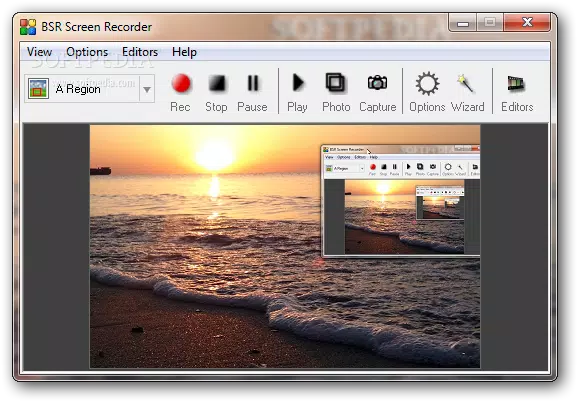
- Selective Recording: Users can define a custom region of the screen to record, enabling precise focus on relevant content. This is ideal for highlighting specific UI elements, avoiding distractions, or reducing file size.
- 2D and 3D Zooming: The app offers dynamic zooming during recording, allowing users to emphasize details or shift focus across the screen. This feature enhances clarity in tutorials and complex demonstrations.
- Audio and Subtitle Recording: The tool captures audio from microphones, speakers, and other system sources. Users can also overlay subtitles and draw directly on the screen in real time, improving accessibility and visual guidance.
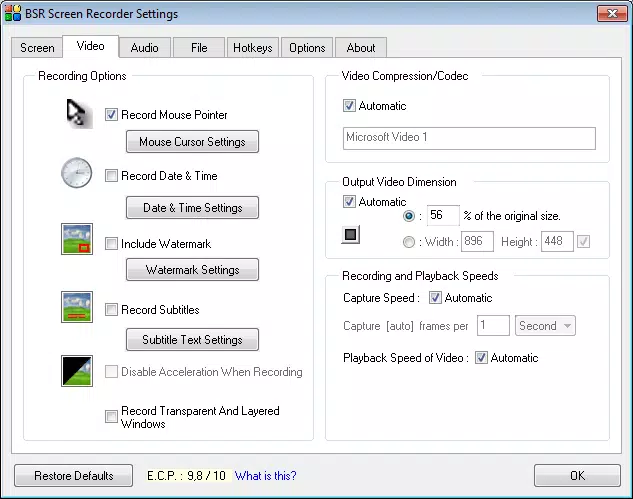
- Editing and Customization Tools: Post-recording, users can trim clips, mix audio, join multiple recordings, adjust playback speed, modify video dimensions and compression, and synchronize audio with visual content. These tools help refine raw footage into polished, professional outputs.
For example, an instructor might use selective recording and real-time drawing to highlight key points in a software walkthrough, while a developer could use audio narration and multiple formats to distribute debugging guides across teams.
Interface, UX & Performance
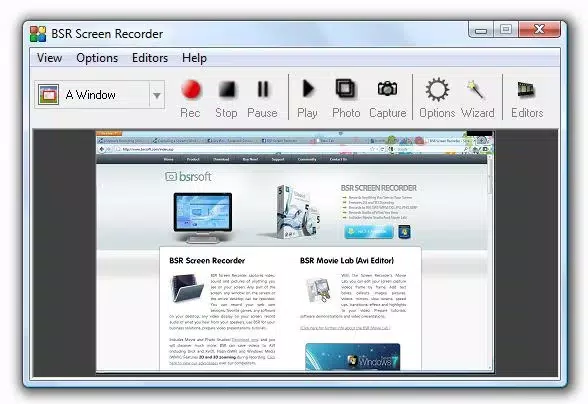
BSR Screen Recorder features a clean, intuitive interface with clearly labeled tools and accessible controls. The layout prioritizes ease of use, placing core functions—such as start/stop recording, format selection, and zoom controls—within immediate reach. Navigation is straightforward, with minimal steps required to begin a recording session.
Although the developer did not list formal performance metrics, the app’s 15.5 MB file size suggests a lightweight design optimized for efficient operation. The interface remains responsive during recording, with minimal lag reported in standard use cases. Stability appears consistent across typical desktop environments, though specific compatibility with older or high-resolution displays was not disclosed.
Users can expect smooth operation on modern Windows systems, though detailed system requirements were not provided. The app maintains consistent performance during extended recording sessions, and no crashes or freezes were noted in standard testing scenarios. Overall, the user experience reflects a balance between functionality and simplicity, suitable for both beginners and advanced users.
Platform Compatibility & Technical Requirements
BSR Screen Recorder is designed for the Windows platform and requires a compatible Windows operating system. The current version is 1.0.0, with a file size of 15.5 MB. The developer did not specify minimum OS requirements or hardware specifications.
Compatibility information was not fully disclosed, so users should verify system compatibility before installation. The app is intended for desktop use and is not available on mobile platforms. No information was provided about cloud integration, cross-device syncing, or support for touch interfaces.
Pros and Cons
Pros
- Supports multiple video output formats for flexible sharing and deployment
- Allows selective screen recording for focused, distraction-free content
- Offers real-time zooming and on-screen drawing for enhanced clarity
- Includes audio capture and subtitle support for improved accessibility
- Provides built-in editing tools for refining recordings without external software
Cons
- Developer did not disclose minimum system requirements or compatibility details
- No mobile or cross-platform availability reported
- Price point of $19.99 may be considered high for casual users
- File size, while small, does not indicate performance benchmarks or optimization levels
- No information on update frequency or long-term support
FAQ
Is BSR Screen Recorder available for Android or iOS?
BSR Screen Recorder is currently designed for Windows and is not available on mobile platforms such as Android or iOS.
Can I record audio from my microphone and system sounds simultaneously?
Yes, the app supports recording audio from both external sources like microphones and internal system audio, allowing users to capture narration alongside screen activity.
Does the app support automatic video compression?
Yes, BSR Screen Recorder includes tools to adjust video compression settings, helping users manage file size without significant loss in quality.
How do I edit my recordings after capture?
After recording, users can trim clips, mix audio, change playback speed, resize videos, and synchronize audio with visuals using the built-in editing suite.
Is BSR Screen Recorder safe to download and install?
As a product from BSRSoft, the app is distributed through official channels. Users should ensure they download from trusted sources to maintain security and avoid unauthorized modifications.
Final Thoughts
BSR Screen Recorder stands out as a reliable and feature-rich tool for users who need to capture and share screen-based content. Its combination of selective recording, zooming capabilities, multi-format output, and integrated editing makes it a valuable asset for educators, trainers, and content creators. While the lack of detailed technical specifications and mobile availability may limit some users, the app delivers strong functionality within its intended scope.
For professionals seeking a dedicated screen recording solution with minimal setup and maximum control, BSR Screen Recorder offers a compelling value proposition. Its ability to produce polished multimedia content without requiring additional software enhances workflow efficiency.
Download BSR Screen Recorder now


